SAP Business ByDesign: Features, Implementation and Costs
SAP Business ByDesign is an integrated, cloud-based ERP (Enterprise Resource Planning) solution for small and medium-sized businesses. The business software offers a comprehensive suite of tools and features that help companies manage various aspects of their operations.
These business management tools cover all key areas, from finance and customer relationship management (CRM) to human resources and inventory management. Integrating all data into a central system simplifies administration, making it clearer, more efficient, and less prone to errors.
Advantages of SAP Business ByDesign for SMEs
SAP Business ByDesign It is particularly suitable for companies with up to 500 users who prefer a cloud-based solution.
On-demand solutions, often referred to as Software-as-a-Service (SaaS), offer several advantages, including:
- Low initial costs: Typically, on-demand solutions like SAP Business ByDesign require little to no initial investment in hardware or software. This reduces the financial burden for businesses, especially small and medium-sized enterprises (SMEs).
- Scalability: SAP Business ByDesign is easily scalable. Companies can add or remove users and adjust their capacity at any time to accommodate growth or seasonal fluctuations.
- Maintenance and updates: The company itself doesn’t need to worry about the maintenance, updates, and security of the software because the SaaS provider is responsible for that. Users automatically have access to the latest features and updates without any additional costs or effort.
- Data security: SaaS providers often invest heavily in security measures and infrastructure to protect their customers’ data. This typically ensures the protection of sensitive data and compliance with industry-specific regulations.
- Accessibility and diversity of use: The web client and cloud-based data storage offer employees greater mobility, as they have access to their data anytime, anywhere via a stable internet connection. This enables work from various locations and supports remote work and home office arrangements. SaaS applications are typically available across different devices and operating systems, further increasing their versatility.
- Fast implementation: SaaS solutions are generally ready for use quickly, as neither complex installation nor lengthy configuration is required.
- Automatic backups: Most SaaS providers offer regular data backups and recovery services to prevent data loss.
- Cost forecast: Due to the monthly or annual subscription fees, companies have a clear idea of the operating costs, which facilitates budgeting.
- Working globally: For internationally operating companies, the SAP Business ByDesign ERP system stands out due to its global usability. It supports multilingualism and has multiple currency capabilities.
SAP Business ByDesign: Review and Outlook
For a quick overview of SAP Business ByDesign: Watch this 2-minute video (in English) with a review and outlook.
What modules does SAP Business ByDesign offer?
This business management tool in the ERP cloud guarantees your company, above all, efficiency and productivity. Its high level of user-friendliness, data security, and the guarantee of expert support from DATA UNIT make SAP Business ByDesign an ideal tool for SMEs.
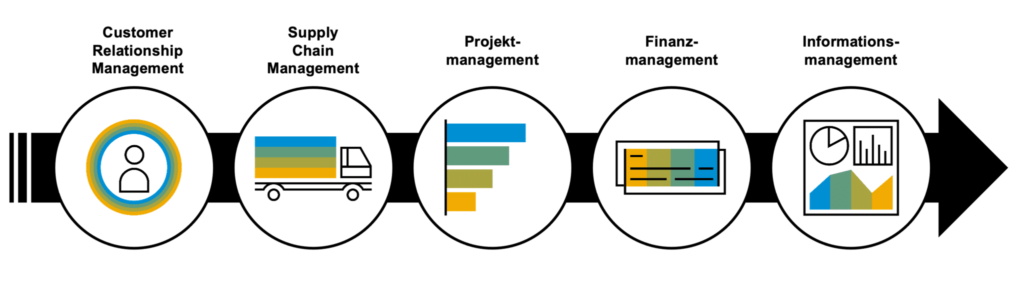
Finance and accounting
In addition to real-time external and internal accounting, cash flow management and the automation of financial processes ensure that you have a constant overview of your company’s current financial situation. This supports cost control. Compliance is also guaranteed. The software can be easily adapted to the legal standards and regulations applicable in Switzerland or locally.
Customer relationship management
With a CRM (Customer Relationship Management) tool, you can clearly manage all customer interactions, track sales and service processes, and organize marketing campaigns. It helps you effectively build and manage customer relationships from the outset, which benefits the company’s growth.
Personnel and resource management
Human resources management is simplified and standardized. SAP Business ByDesign supports both recruitment and… Onboarding new employees, as well as time tracking, self-service functions and payroll.
Supply Chain Management
SAP Business ByDesign makes supply chain management seamless and transparent. It covers everything from purchasing and inventory management to order processing and supplier relationship management. It also includes product development, forecasting, manufacturing, Warehouse management Logistics can be processed with this tool.
Built-in Analytics
SAP Business ByDesign offers extensive analysis tools, such as KPI (Key Performance Indicators) and report monitoring, multidimensional reporting and analysis functions, dashboards, Excel-based reporting and open APIs (Application Programming Interfaces).
Project management
With the ERP system SAP Business ByDesign also makes it easier and more efficient to plan, execute, and monitor projects because it ensures collaboration across all functional areas. This is particularly useful for service-oriented industries and companies with complex project requirements.
Compliance with tax regulations
SAP Business ByDesign offers a wide range of functions and tools to help your company comply with tax regulations in different countries and regions. This includes defining tax rates, tax types, and tax rules that are applied to business transactions.
Implementing SAP Business ByDesign: Step-by-step instructions
Implementing SAP Business ByDesign typically requires the support of an SAP expert or an implementation partner. Most implementations are complex and must be tailored to the specific requirements of the company. Therefore, it is advisable to seek professional support, such as from… Experts from Data Unit to be consulted.
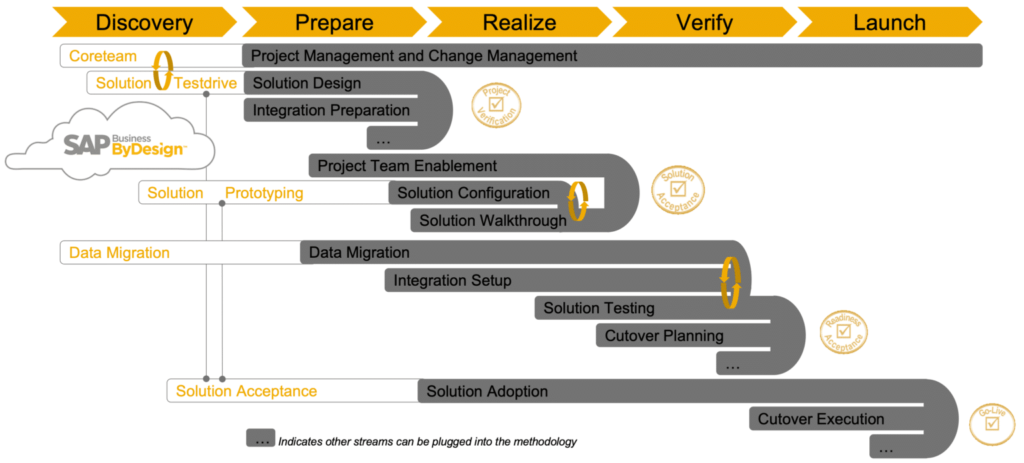
The implementation process is as follows:
1) Preparation and planning
Identify and analyze the business requirements and implementation goals. Assemble a team responsible for managing the SAP Business ByDesign implementation and create a project plan.
2) Evaluation and licenses
Discuss the licensing costs and terms of the new ERP system with your SAP partner to determine which is best suited to your company and the legal requirements in Switzerland. Establish a budget for the implementation that covers software licensing costs, hardware costs, training costs, and other expenses.
3) Data migration
All important data, such as customer, supplier, product, and financial information, is transferred to the new ERP system. Then, it is configured and specifically customized to meet Swiss legal requirements and all of the company’s needs. This may include setting VAT rates, language adjustments, complying with data protection regulations, or adhering to local requirements.
4) Training
All employees who will be working with SAP Business ByDesign must be trained and prepared for the transition. In addition to formal courses, SAP offers numerous online resources. Interested individuals can deepen their knowledge and find answers to their questions through videos, documentation, and user forums.
5) Testing and pilot phase
Comprehensive testing ensures your ERP system functions as intended. Any identified errors are resolved, and the system is retested until everything runs smoothly. During the pilot phase, SAP Business ByDesign is deployed on a limited scale to test its practical suitability.
6) Data migration and go-live
All remaining or necessary data will be integrated into SAP Business ByDesign and official operations will begin.
7) Ongoing support and maintenance
Creating a support plan is necessary to ensure the smooth operation and maintenance of SAP Business ByDesign. Monitor the performance of the ERP software and ensure it meets all business requirements and objectives.
How much does SAP Business ByDesign cost?
SAP Business ByDesign is typically billed via monthly or annual subscription fees per user. The price varies depending on the number of users, the required modules and features, and any necessary additional services and customizations. We create customized quotes for each company based on its specific requirements.
There are four components to consider when calculating the price:
- The costs for implementing the software vary depending on the complexity of the project and the necessary customizations.
- With the cloud solution, there may be hardware costs for end devices and network infrastructure.
- The cost of software licenses varies depending on the number of users and the desired features.
- There may be costs for training users and administrators so that they can use the new system effectively and constructively.
A personal consultation with our experts allows us to not only provide a comprehensive assessment of your company’s situation, but also an overview of the total costs incurred over the usage period.
Ensure you have a clear understanding of the total cost of ownership to make informed budget decisions and avoid unexpected expenses during the implementation and ongoing use of SAP Business ByDesign.
However, it’s important to note that SaaS solutions are not suitable for every company or application. Before opting for an on-demand solution, you should consider the specific requirements and characteristics of your own business.Roger Wipfli (Chief Sales Officer – DATA UNIT)
The decision to implement an ERP system is based on a careful assessment of the company’s specific needs, budget, and growth plans. Therefore, consult with the experts at Data Unit to find the best ERP system for your unique business.
Take the next step for your business with SAP Business ByDesign. Click here to schedule a personalized demo!