SAP Business ByDesign – 2023 Review and 2024 Outlook
Hear firsthand from Rainer Zinow, SVP, Head of SAP Midmarket Product Management, what was achieved with SAP Business ByDesign in 2023. You will also get an outlook on SAP’s plans for 2024.
SAP Business ByDesign is an integrated, cloud-based ERP (Enterprise Resource Planning) solution for small and medium-sized businesses. The business software offers a comprehensive suite of tools and features that help companies manage various aspects of their operations.
These business management tools cover all key areas, from finance and customer relationship management (CRM) to human resources and inventory management. Integrating all data into a central system simplifies administration, making it clearer, more efficient, and less prone to errors.
Advantages of SAP Business ByDesign for SMEs
SAP Business ByDesign It is particularly suitable for companies with up to 500 users who prefer a cloud-based solution.
On-demand solutions, often referred to as Software-as-a-Service (SaaS), offer several advantages, including:
- Low initial costs: Typically, on-demand solutions like SAP Business ByDesign require little to no initial investment in hardware or software. This reduces the financial burden for businesses, especially small and medium-sized enterprises (SMEs).
- Scalability: SAP Business ByDesign is easily scalable. Companies can add or remove users and adjust their capacity at any time to accommodate growth or seasonal fluctuations.
- Maintenance and updates: The company itself doesn’t need to worry about the maintenance, updates, and security of the software because the SaaS provider is responsible for that. Users automatically have access to the latest features and updates without any additional costs or effort.
- Data security: SaaS providers often invest heavily in security measures and infrastructure to protect their customers’ data. This typically ensures the protection of sensitive data and compliance with industry-specific regulations.
- Accessibility and diversity of use: The web client and cloud-based data storage offer employees greater mobility, as they have access to their data anytime, anywhere via a stable internet connection. This enables work from various locations and supports remote work and home office arrangements. SaaS applications are typically available across different devices and operating systems, further increasing their versatility.
- Fast implementation: SaaS solutions are generally ready for use quickly, as neither complex installation nor lengthy configuration is required.
- Automatic backups: Most SaaS providers offer regular data backups and recovery services to prevent data loss.
- Cost forecast: Due to the monthly or annual subscription fees, companies have a clear idea of the operating costs, which facilitates budgeting.
- Working globally: For internationally operating companies, the SAP Business ByDesign ERP system stands out due to its global usability. It supports multilingualism and has multiple currency capabilities.
SAP Business ByDesign: Review and Outlook
For a quick overview of SAP Business ByDesign: Watch this 2-minute video (in English) with a review and outlook.
What modules does SAP Business ByDesign offer?
This business management tool in the ERP cloud guarantees your company, above all, efficiency and productivity. Its high level of user-friendliness, data security, and the guarantee of expert support from DATA UNIT make SAP Business ByDesign an ideal tool for SMEs.
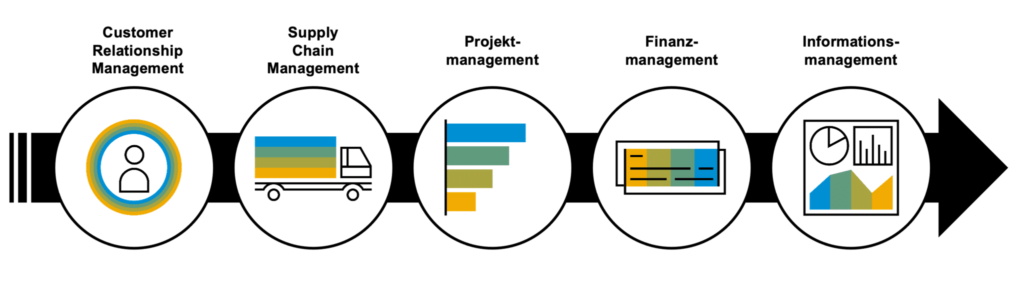
Finance and accounting
In addition to real-time external and internal accounting, cash flow management and the automation of financial processes ensure that you have a constant overview of your company’s current financial situation. This supports cost control. Compliance is also guaranteed. The software can be easily adapted to the legal standards and regulations applicable in Switzerland or locally.
Customer relationship management
With a CRM (Customer Relationship Management) tool, you can clearly manage all customer interactions, track sales and service processes, and organize marketing campaigns. It helps you effectively build and manage customer relationships from the outset, which benefits the company’s growth.
Personnel and resource management
Human resources management is simplified and standardized. SAP Business ByDesign supports both recruitment and… Onboarding new employees, as well as time tracking, self-service functions and payroll.
Supply Chain Management
SAP Business ByDesign makes supply chain management seamless and transparent. It covers everything from purchasing and inventory management to order processing and supplier relationship management. It also includes product development, forecasting, manufacturing, Warehouse management Logistics can be processed with this tool.
Built-in Analytics
SAP Business ByDesign offers extensive analysis tools, such as KPI (Key Performance Indicators) and report monitoring, multidimensional reporting and analysis functions, dashboards, Excel-based reporting and open APIs (Application Programming Interfaces).
Project management
With the ERP system SAP Business ByDesign also makes it easier and more efficient to plan, execute, and monitor projects because it ensures collaboration across all functional areas. This is particularly useful for service-oriented industries and companies with complex project requirements.
Compliance with tax regulations
SAP Business ByDesign offers a wide range of functions and tools to help your company comply with tax regulations in different countries and regions. This includes defining tax rates, tax types, and tax rules that are applied to business transactions.
Implementing SAP Business ByDesign: Step-by-step instructions
Implementing SAP Business ByDesign typically requires the support of an SAP expert or an implementation partner. Most implementations are complex and must be tailored to the specific requirements of the company. Therefore, it is advisable to seek professional support, such as from… Experts from Data Unit to be consulted.
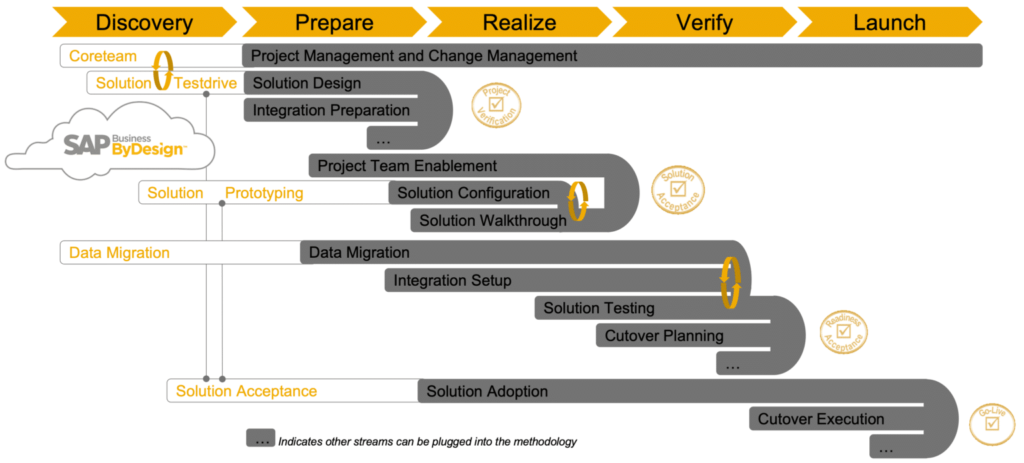
The implementation process is as follows:
1) Preparation and planning
Identify and analyze the business requirements and implementation goals. Assemble a team responsible for managing the SAP Business ByDesign implementation and create a project plan.
2) Evaluation and licenses
Discuss the licensing costs and terms of the new ERP system with your SAP partner to determine which is best suited to your company and the legal requirements in Switzerland. Establish a budget for the implementation that covers software licensing costs, hardware costs, training costs, and other expenses.
3) Data migration
All important data, such as customer, supplier, product, and financial information, is transferred to the new ERP system. Then, it is configured and specifically customized to meet Swiss legal requirements and all of the company’s needs. This may include setting VAT rates, language adjustments, complying with data protection regulations, or adhering to local requirements.
4) Training
All employees who will be working with SAP Business ByDesign must be trained and prepared for the transition. In addition to formal courses, SAP offers numerous online resources. Interested individuals can deepen their knowledge and find answers to their questions through videos, documentation, and user forums.
5) Testing and pilot phase
Comprehensive testing ensures your ERP system functions as intended. Any identified errors are resolved, and the system is retested until everything runs smoothly. During the pilot phase, SAP Business ByDesign is deployed on a limited scale to test its practical suitability.
6) Data migration and go-live
All remaining or necessary data will be integrated into SAP Business ByDesign and official operations will begin.
7) Ongoing support and maintenance
Creating a support plan is necessary to ensure the smooth operation and maintenance of SAP Business ByDesign. Monitor the performance of the ERP software and ensure it meets all business requirements and objectives.
How much does SAP Business ByDesign cost?
SAP Business ByDesign is typically billed via monthly or annual subscription fees per user. The price varies depending on the number of users, the required modules and features, and any necessary additional services and customizations. We create customized quotes for each company based on its specific requirements.
There are four components to consider when calculating the price:
- The costs for implementing the software vary depending on the complexity of the project and the necessary customizations.
- With the cloud solution, there may be hardware costs for end devices and network infrastructure.
- The cost of software licenses varies depending on the number of users and the desired features.
- There may be costs for training users and administrators so that they can use the new system effectively and constructively.
A personal consultation with our experts allows us to not only provide a comprehensive assessment of your company’s situation, but also an overview of the total costs incurred over the usage period.
Ensure you have a clear understanding of the total cost of ownership to make informed budget decisions and avoid unexpected expenses during the implementation and ongoing use of SAP Business ByDesign.
However, it’s important to note that SaaS solutions are not suitable for every company or application. Before opting for an on-demand solution, you should consider the specific requirements and characteristics of your own business.Roger Wipfli (Chief Sales Officer – DATA UNIT)
The decision to implement an ERP system is based on a careful assessment of the company’s specific needs, budget, and growth plans. Therefore, consult with the experts at Data Unit to find the best ERP system for your unique business.
Take the next step for your business with SAP Business ByDesign. Click here to schedule a personalized demo!
From January 1, 2024, an increase in value-added tax (VAT) will come into effect in Switzerland. The standard rate will increase from 7.7% to 8.1%, the reduced rate will be 2.6% instead of 2.5%, and the special rate for accommodation will be 3.8% instead of 3.7%.
This increase is an important fiscal policy measure to ensure Switzerland’s long-term financial stability. General inflation and rising expenditures in healthcare, education, and infrastructure necessitate more funding. The VAT increase is intended to close part of the funding gap.
| VAT rates | Valid from October 01.01.2024st, XNUMX | Valid until 31.12.2023 |
| Standard rate | 8.1% | 7.7% |
| Reduced rate | 2.6% | 2.5% |
| Special rate for accommodation | 3.8% | 3.7% |
The VAT increase This has an impact on everyone, citizens and businesses alike. Small and medium-sized enterprises in particular need to prepare thoroughly to comply with the administrative requirements.
What are the effects of the VAT increase?
The VAT increase often leads to price increases. Companies have to pay more in taxes, and in most cases, they pass this increase on to customers by also raising the prices of their services and products.
This, in turn, affects consumer behavior. Since customers have higher living costs, they carefully consider what they want to spend their money on.
Cost management of the VAT increase
Companies face the challenge of covering rising tax costs while maintaining profitability and competitiveness. VAT is a significant component of pricing and can impact a company’s success.
This switch to the new tax rate can lead to staffing and/or resource problems, especially for small and medium-sized enterprises (SMEs). Companies risk having higher prices than their competitors after the adjustment, which can negatively impact their budget and profitability.
Companies should therefore carefully consider in which areas or for which products price adjustments are made. Short-term offers, discounts, and price reductions can sweeten the bitter pill for customers.
Legal aspects and compliance with VAT increases
The planned VAT increase in Switzerland in 2024 will not only bring economic changes but also have implications for legal aspects and tax compliance. Companies must meet the new legal requirements to avoid potential legal consequences. Here are some key points regarding legal aspects and tax compliance:
1. Adaptation to new VAT rates:
The new VAT rates need to be integrated into accounting systems and business processes. This may require updates to sales and invoicing systems to ensure the correct tax rates are applied.
“ERP systems are generally prepared for VAT changes. In the case of SAP Business One, this takes approximately fifteen minutes. This includes all special cases with the new tax rate in 2023 or the old tax rate in 2024, as well as updating the VAT form. The VAT codes remain unchanged; the rates are controlled by the posting date. I recommend integrating these adjustments early on.”
Bruno Mühlebach, ERP Consultant
ERP systems such as SAP Business One or SAP Business by Design They allow for a relatively simple transition, while decentralized or outdated management systems often involve more personnel and labor costs. Should you have any questions or doubts, please contact our ERP experts. You can also find further information in our wiki. How to adjust tax rates in SAP Business One or in the following video.
2. Tax documentation:
Accurate documentation of transactions ensures that all tax records are properly maintained, including invoices, receipts, and records of VAT payments. This facilitates compliance with tax regulations and audits by the tax authorities.
3. Review of existing contracts:
Existing contracts should be reviewed to ensure they correctly reflect the new VAT rates. This may include contracts with suppliers, customers, and service providers. If necessary, contracts must be amended and renegotiated.
4. Timetable for the VAT increase:
Businesses must closely monitor the timing of the VAT increase and ensure they apply the new rates from that point onward. This can have a significant impact on invoicing cycles and payment deadlines.
Neither the invoice date nor the payment date is decisive for the applicable tax rate. Only the date the service is rendered counts. Therefore, the increase can already apply to invoices issued during 2023.
This applies particularly to invoices issued in 2023 that fall wholly or partially into the 2024 service period, such as partial payment invoices, advance payment invoices or invoices for periodic services.
Conversely, this also applies to 2024 if subsequent reductions in remuneration and returns are received that fall within the 2023 performance period.
Which industries are most affected by the VAT increase?
The impact of the VAT increase depends on various factors, including specific business models, the competitive landscape, and consumer response. Some sectors will therefore be more affected by this change than others.
1. Retail:
The retail sector is often most directly affected by VAT increases, as price hikes are passed directly on to customers. Consumers may become more hesitant to purchase products that have become more expensive due to the tax increase. This could potentially lead to a decline in sales in certain areas.
2. Gastronomy and tourism:
The hospitality and tourism industry is particularly sensitive to price fluctuations. Higher VAT rates can lead to rising prices for restaurants, hotels, and leisure activities, negatively impacting demand.
3. Construction and real estate sector:
The construction and real estate sector could also be affected by the VAT increase, as it raises the costs of construction and renovation projects. This, in turn, impacts the demand for real estate and construction projects.
4. Healthcare and Education:
Services in the healthcare and education sectors are generally exempt from VAT, but indirect effects can still be felt. Rising living costs could strain people’s budgets and affect their willingness to invest in healthcare and education services.
5. Luxury goods:
The luxury goods industry is generally less affected by the VAT increase. Buyers of luxury goods are usually not as price-sensitive when prices rise.
6. Export-oriented companies:
Export-oriented companies will also be less affected by the VAT increase. They primarily sell their products abroad, and in this case, a tax increase has less of an impact on prices and competitiveness.
Tips and best practices for increasing VAT
1. Early preparation:
Start preparing for the VAT increase early. The more lead time you have, the better you can adjust to the changes.
2. Thorough training:
Train your staff, especially those responsible for accounting and tax compliance. Ensure they understand and can apply the new VAT rates and regulations.
3. Software update:
Check your accounting and invoicing systems for updates to ensure you can correctly apply the new VAT rates. Make sure your software provider delivers the necessary updates.
4. Review of contracts:
Review existing contracts and agreements to ensure you correctly account for the VAT increase. If necessary, amend contracts and explain the price increase to your contractual partners.
5. Regular monitoring:
Establish regular monitoring mechanisms to ensure that VAT rates are applied correctly. This may include internal audits and controls.
6. Transparency in communication:
It is advisable to explain the price increase to customers clearly and transparently. This strengthens customer trust and prevents misunderstandings. Special offers and discounts can mitigate the impact on customers.
7. Expert consultation:
Consult tax experts and accounting advisors to ensure you are following best practices for your specific situation.
8. Keep the documentation:
Keep detailed records of all tax transactions and VAT payments. Accurate documentation is crucial to demonstrate compliance.
9. Cash flow management:
In cash flow management, companies must ensure they have sufficient liquidity to pay the higher taxes without jeopardizing their operational activities.
If your company already uses an ERP system, the transition to the VAT increase will proceed without major problems. If you are considering purchasing such a system, speak with one of our experts and let them explain and demonstrate its advantages.
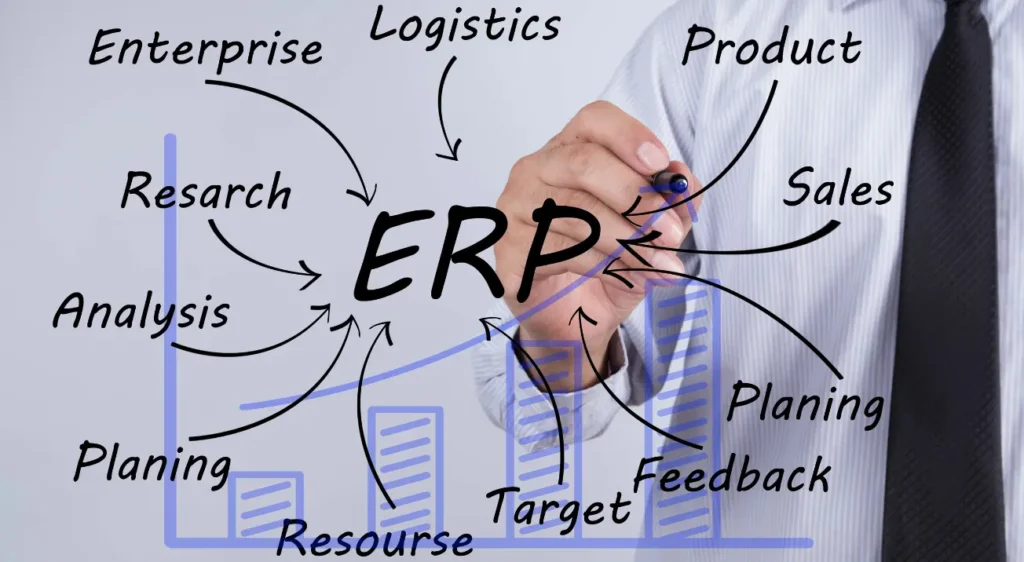
ERP software is a special type of software that allows you to manage your company’s daily operations in unprecedented ways.
They don’t know what ERP is, but they also don’t want to deal with it any longer. Spreadsheets Struggling with ERP systems? Then this article is for you. We’ll guide you step-by-step through the features and functions of ERP systems so you can make an informed decision about whether it’s worth implementing in your company.
What is an ERP system?
The abbreviation ERP means company-wide resource planning
It is a central and comprehensive system that integrates all of a company’s resources, information, and activities. ERP software consolidates, standardizes, and accelerates all business processes, including finance, HR, quality management, inventory, sales, and reporting.
An ERP system has a single, shared database, which enables real-time data visibility.
Through a shared database and real-time data visibility, a single source of information is provided for all interested parties within the company.
What is ERP software?
Now that you know the answer to the question: “What is an ERP?”, let’s talk about its functions.
Developed as a complete business management system – from customer order entry to manufacturing process, programming and accounting – are in a ERP solution such as SAP Business One The most important business functions are centrally bundled, and the following solutions are integrated at the same time:
- Quality control: Management of tests, protocols and compliance.
- Material requirements planning: efficient use of resources, taking supply and demand into account.
- Electronic data exchange: automates transactions with business partners.
- Software for order management: Management system for services and repairs.
- Sales demand planning: Inventory management throughout the entire supply chain and warehouse.
- Warehouse management systemInventory transactions in real time.
- Batch traceability: Functions for tracking raw materials, intermediate products and finished products.
- KittingOrdering, selling and shipping packaged products.
- Project costsBudget and cost control for a specific job.
- Research and Development (F + E): Development and change history of products.
- Customer relationship managementManages contacts, sales, and activities.
- Point of sale: mobile management system for retailers.
- Direct branch delivery: mobile platform for sales and rolling delivery.
- Project costsBudget and cost control for a specific job.
- Reports, forecasts and predictive analysisInteractive dashboards with notification functions.
- PortalBusiness information accessible to customers and employees.
When do I need an ERP system? 5 key moments
Many growing companies use a variety of tools to manage their functions and data. These signals are helpful if you need to know whether you are ready for an ERP system.
Reports
Without the right data, you can’t make informed decisions. An ERP system allows you to analyze and visualize data and generate basic reports to identify inventory depletion, cost fluctuations, or quality issues.
I want to know my inventory levels
Inventory management can be a headache for many companies. An ERP system allows a business to operate more flexibly. At the same time, it ensures that demand is met effectively and storage costs are kept low.
I want to have more control
Manual entries and the resulting errors, as well as the lack of automated tasks, make manual bookkeeping complicated and frustrating.
With an ERP system, you have a central database that gives you access to a single data source, ensuring absolute reliability.
I want to serve customers better.
Unfulfilled orders and delayed shipping negatively impact customer satisfaction. An ERP system fully and accurately records and stores customer data throughout the entire sales process, contributing to a better quality of customer relationships and allowing you to personalize your interactions with them.
I want to grow
If you have multiple legacy systems, you probably feel that you are missing many basic functions.
A scalable ERP system allows you to personalize the required functions and add product lines, locations, and additional resources.
What options are there for ERP implementation?
Once you realize that ERP software could be a big deal for your company, you might first think about licenses and software installations.
These are your options if you want a good ERP solution.
ERP On-Premise
Despite the convenience of web-based versions, many existing solutions opt for on-premises installation. The ERP provider works with your team to install, implement, and maintain the ERP solution.
ERP Cloud
Many ERP solutions now offer convenient online access, allowing you to forgo on-site installation, thereby saving on hardware costs and purchasing a license model with monthly or annual fees.
Now that you know what ERP software is, you can learn more about which features are relevant to you and how different providers can help you with their solutions. Start by looking at the industry-leading software. SAP Business One We look forward to getting to know you. We welcome your comments.
The last few years have shown that Digital technology is not a passing fad., but a way to connect people, increase the profitability of companies and stay ahead of the competition.
This new article explains what a digital transformation process in SMEs consists of and what its advantages and disadvantages are.
What is digital transformation?
Digital transformation can be defined as “the change of a company’s processes, relationships and channels to create value for customers”.
The ultimate goal is to achieve a positive impact on the business.
While digital tools are important in this “transformation”, their basis is the reorganization of processes.
Benefits of digital transformation
Digital transformation has many advantages, both for the customer and for the team.
The advantages of digital processes include, in particular:
Greater customer satisfaction
As a result of digitalization, the customer experiences improvements in service, such as shorter waiting times for receiving their orders.
There are more interaction channels, which means that customers can interact with the company with greater ease.
Fewer manual processes
Process automation can open up a world of opportunities as part of digital transformation. Here are some tasks that can be automated:
- Collection of customer data
- Order tracking
- Registration of incoming and outgoing goods
- invoicing
- payroll
- Email notifications
- Creation of helpdesk tickets
If you have a small or medium-sized business, you should remember that it is not only possible to automate and digitize these tasks, but the real value comes when entire processes are digitized and workflows are created that perform tasks faster and with fewer errors.
Better Decision Making
SMEs that apply digital transformation to their business processes generate a vast amount of data. This data can be used to identify patterns and opportunities for improvement.
This results in easier and more precise decision-making, always based on data.
Scalability
Although technology has advanced significantly in many companies since the 80s, not all have digital processes. In fact, many legacy systems present bottlenecks when it comes to integrating new digital alternatives.
More digitalization means being able to scale processes, workflows and tasks.
Challenges of digital transformation
The above advantages bring with them some challenges, including the following:
Organizational and cultural change
Digital transformation leads to major organizational and cultural changes. It is necessary to communicate this idea to the team and involve them in the process.
You can have a brilliant digital transformation strategy, but if you don’t understand that it goes beyond technology, it won’t work.
Technical barriers and the digital divide
New technologies can pose a threat to the long-term employees of some SMEs.
This is a particularly big challenge in the digital transformation of SMEs, because some employees may resist major changes that require adaptation.
Heavy workload
Another major challenge of digital transformation is that it consumes many resources, especially time and money.
The process is often carried out slowly and deliberately, which necessitates flexibility and an iterative approach.
Required weighting
The heavy workload necessitates prioritizing tasks; digital transformation cannot be accomplished all at once. Depending on the type of company and industry, it is necessary to set priorities and establish a roadmap aligned with business objectives.
If you are considering purchasing SAP software, it is because you are aware of the capabilities of this business software, which can increase the efficiency of processes in your company.
In this article, we will guide you through the decisions you need to make if you want to make a smart decision.
What is SAP: Software and Business
SAP has two definitions. On the one hand, SAP stands for Systems Applications Products, the company founded in 1972 by Dietmar Hopp, Klaus Tschira, Hans-Werner Hector, Hasso Plattner and Claus Wellenreuther, which today has more than 70.000 employees and 65 billion in annual revenue.
The second definition of SAP refers to the ERP system. In its founding year, SAP launched the financial accounting system RF. RF is the basis of the first ERP system, which was later released under the name SAP R/1.
The origins of SAP
Compared to the time before ERP systems existed, SAP represented enormous progress in the management and control of a company. To understand this, it’s worth looking back at the past.
Before ERP software like SAP existed, all data generated within a company had to be documented and processed manually or in a custom-developed system. While this was still manageable for individual business units, networking proved highly problematic: different database systems used different file formats that were often incompatible.
As a result, not all systems functioned perfectly, leading to inconsistencies. The consequence: The processes could not be executed, or only with a delay.
An example of how the processes used to be
A simple example will help you understand this better. A company sells various products and has a warehouse and an online shop. Inventory is tracked in logistics software to which the online shop has no access.
Instead, the inventory is only checked when the order is processed. The result: The customer doesn’t receive their goods and the company makes no revenue.
This example can be applied to all areas of the company, from purchasing and accounting to marketing and sales.
From ERP solutions for large corporations to lean cloud solutions for medium-sized businesses
This has changed with SAP. It offers standardized software that combines all previously separate functions, thus consolidating all data in a uniform format from the outset. This has enormous advantages for all industries.
It helps the company to link processes and departments, thereby increasing efficiency. At the same time, an ERP system facilitates performance evaluation and data-driven decision-making for the company’s future.
Today, SAP offers not only an ERP system, but also various specialized solutions.
SAP has not stood still, but has changed over time. Over the years, increasingly sophisticated solutions have been added, tailored to the needs of industry, banking, media and retail.
While initially the software company’s customers were primarily large corporations, today the company increasingly targets small and medium-sized enterprises with a wide range of products.
SAP in the age of digitalization
The entire economy has fundamentally changed in the last two decades. Under the banner of digital transformation, profound change processes are taking place, modifying business models, structures, and value chains. This is also reflected in ERP systems.
The need for ERP systems that adequately reflect the faster and more agile working methods in companies and markets has grown. SAP Business ByDesign SAP has launched an ERP system that meets precisely this need.
It is specifically tailored to the needs of small and medium-sized enterprises that want to survive in a digitally transformed landscape.
Unlike the on-premise solution SAP Business One, it does not have its own digital infrastructure, but is operated in the cloud.
The advantages are numerous: Company users can easily access the system via the internet. A physical presence at the company is not required.
By purchasing SAP software, companies also save on personnel costs associated with setting up and maintaining an ERP system infrastructure. Furthermore, SAP Business ByDesign offers a scalable solution for companies anticipating strong growth.
Buying SAP software: the basics of a license
SAP is a powerful ERP (Enterprise Resource Planning) software specifically designed for manufacturers and distributors, as well as retailers and service companies, and is aimed at all types of businesses.
The price depends on many factors, such as the number of users who will use the software, the changes you need to make to adapt it to your company’s needs, and many other considerations.
One of the innovations you should be aware of is that SAP has strongly committed to a cloud model, which has significantly lowered the price threshold.
In the past, SAP’s management software was a leader in on-premises enterprise software, which is great news, but comes with implementation costs and expenses that are eliminated with the cloud version.
What does that mean for you?
It means you can leverage the full potential of SAP without having to worry about your own internal IT infrastructure.
How much does it cost to implement SAP in a company?
While this isn’t the answer we’d like to give you, the reality is that the price of purchasing SAP software depends on it.
What does it depend on? Your needs and what you’re hiring for. If you want to start asking the questions that will get you closer to a reliable answer, consider the following:
- How many user licenses do I need?
- What type of user licenses are best suited for my company?
- What about users who only need access to the data and not to Business One?
- Which modules within SAP B1 need to be configured?
- How many companies and locations will need the Business One modules?
- Are there any important third-party plugins for my business that need to interact with the system?
- What kind of support will I need after commissioning?
- What adjustments will my ERP solution require?
- How many users need to be trained?
- Do I need in-house training or distance learning?
Buying SAP software, conclusion
If you’re interested in purchasing SAP software, you can start by answering the questions we just addressed. Alternatively, feel free to contact us for a no-obligation consultation so we can advise you on selecting the most suitable solution and offer a personalized demonstration for your business. We look forward to hearing from you.n, können Sie mit der Beantwortung der Fragen beginnen, die wir soeben beantwortet haben. Sie können sich auch unverbindlich mit uns in Verbindung setzen, damit wir Sie bei der Auswahl der für Sie am besten geeigneten Lösung beraten und Ihnen eine persönliche Demonstration für Ihr Unternehmen anbieten können. Wir werden auf Sie warten.