SAP Business One: Advantages, modules and costs

SAP Business One (SAP B1) is an ERP software specifically designed for small and medium-sized enterprises (SMEs). ERP stands for Enterprise Resource Planning and describes software that allows for the centralized management of various areas of a company. SAP Business One enables SMEs to gain greater control and oversight of all business processes and does not require the complex functional components offered by large ERP systems.
SAP Business One is a standard business software suitable for companies with up to 250 users. This makes the software ideal for start-ups and subsidiaries of large companies.
What are the advantages of SAP Business One?
SAP Business One can be flexibly adapted and extended to meet specific business requirements.
By networking the business units, the workload caused by duplicate and often inaccurate data entry is reduced. This digital data transparency makes it possible to better monitor and manage the company.
Since SAP Business One is designed for small and medium-sized businesses, the software also impresses with its pricing and rapid implementation time. The cloud version, in particular, is productive after just a few weeks. Thanks to its intuitive interface, employee training requirements are kept to a minimum.
Which modules does SAP Business One include?
The ERP system connects all areas of the company, ensuring seamless and transparent business processes. It offers a comprehensive suite of business applications that includes finance, sales, purchasing, inventory management, and production.
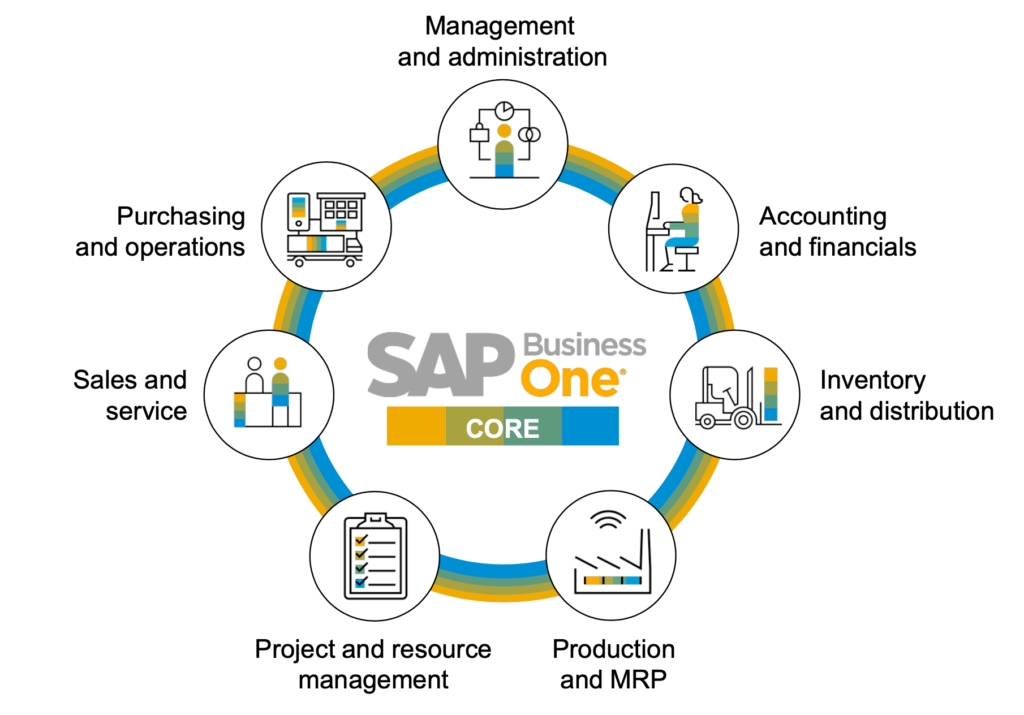
Financial management
The ERP software supports not only accounting but also controlling. The most important accounting processes can be automated. SAP Business One monitors cash flow and controls the budget.
The system can also handle banking transactions, including account reconciliations, as well as the management of fixed assets. Planning, auditing, and review processes are supported and simplified by standardized and customized reports with real-time data.
Customer data management
SAP Business One includes an integrated Customer Relationship Management (CRM) system that allows you to efficiently manage and shape your customer relationships. The software provides an overview of the entire customer lifecycle, from initial contact to post-sales support.
Warehousing and distribution
Managing deliveries is time-consuming and error-prone when done manually. SAP Business One enables precise inventory tracking, which… Accuracy and efficiency of warehouse management Significantly improved. It monitors inventory levels in real time, tracks deliveries, and effectively controls stock movements.
Furthermore, SAP Business One offers inventory forecasting capabilities to prevent overstocking or shortages. This leads to reduced storage costs and improved cash flow. An automated, streamlined, and faster delivery process further enhances customer satisfaction.
Business intelligence
Numerous analytics and reporting tools produce up-to-date and accurate reports using data from across the entire company. These reports can be customized. The data is transformed into meaningful information, enabling better strategic decisions that ensure the company’s growth and success.
You can find more information in our blog article: The analytical capability of business intelligence.
Web client
All authorized employees can access selected master data and processes in SAP Business One via the web client. The focus here is on creating, editing, and maintaining sales documents, items, activities, and data from contacts and business partners.
Extensions: Add-ons for SAP Business One
SAP Business One is modular and can be adapted to different industries and company structures. Service-oriented companies use it for professional planning of technicians, vehicles, materials, and tools. Field Service Management.
Other possible expansions exist for production, trade, and services. These include, among others: Finance Package (advanced financial tools), Scan and Attach (Document management system) or Swiss Salary (Payroll accounting specifically for Switzerland).
SAP Business One on-premise or in the cloud
There are two ways to run SAP Business One: either locally in the company (on-premise) or in the cloud.
On-premise This means “on-premises.” SAP Business One is installed and operated on the company’s own servers. The main advantage of this solution lies in the company’s complete control and ownership of the IT infrastructure and software.
In some cases, a local installation can be more powerful than the cloud solution, especially when dealing with resource-intensive applications.
It is also possible to adapt on-premise software more closely to the specific needs of a company, as there are no restrictions imposed by cloud providers.
Advantages of SAP Business One On-Premise:
- Compliance with internal data security guidelines
- Direct control and access to the data
- Business processes can be adapted and expanded more efficiently.
- Use of internal hardware and existing IT infrastructure and resources. Responsibility for maintenance and updates lies with the company.
- While perpetual licensing means higher initial costs, it results in lower overall costs in the long run. This leads to greater transparency and better cost control, as there are no recurring subscription fees for cloud services.
- In some industries and regions, on-premise solutions are necessary to meet regulatory requirements.
However, it’s important to note that an on-premises solution can also have disadvantages, such as higher initial investments and responsibility for maintenance. Additional IT investments may also be necessary if existing hardware resources are insufficient.
During an installation in the cloud The software is hosted in an external data center. You pay a monthly fee for the necessary IT resources and licenses. IT overhead is significantly reduced because hosting is handled by an external partner.
Advantages of SAP Business One in the cloud:
- Fast and cost-effective implementation
- Secure browser-based access from anywhere, anytime.
- Access to the latest features without having to rely on internal IT staff.
- Business functions can be managed in a web browser.
More information about the topic SAP Business One Cloud vs. On-Premise can be found on our blog.
There are good arguments for both versions. Which one is ultimately best for your company depends on numerous factors, such as the available budget or the existing IT infrastructure.
Costs and price of SAP Business One
SAP Business One generally offers excellent value for money, especially for SMEs. It is characterized by its quality, wide range of functions, and low cost.Roger Wipfli (Chief Sales Officer – DATA UNIT AG)
The costs for SAP Business One can vary and depend on several factors, such as the size and objectives of the company, the number of users, the implementation method (on-premise or cloud), and the specific requirements of the company or industry. There are four components to consider:
- The costs for implementation The software costs vary depending on the complexity of the project and the necessary or desired customizations.
- The costs of operating the system It depends on whether it’s an on-premises or cloud solution. On-premises solutions may incur hardware costs for servers and network infrastructure.
- The costs for the software licenses depend on the number of users and the desired functions.
- The costs for the training by users and administrators, in order to use the software effectively.
With our cost calculator You can request a free, no-obligation price quote for your company. A personal consultation with the experts at DATA UNIT AG will not only provide a comprehensive assessment of your business situation but also an overview of the total costs incurred over the entire duration of your SAP Business One implementation. Contact us today!ernehmen erstellen lassen. Bei einem persönlichen Gespräch mit den Experten von DATA UNIT AG lässt sich nicht nur eine umfassende Bewertung der Unternehmenssituation ermitteln, sondern auch ein Überblick über die Gesamtkosten, die sich über die Laufzeit der Nutzung von SAP Business One ergeben. Kontaktieren Sie uns noch heute!
From January 1, 2024, an increase in value-added tax (VAT) will come into effect in Switzerland. The standard rate will increase from 7.7% to 8.1%, the reduced rate will be 2.6% instead of 2.5%, and the special rate for accommodation will be 3.8% instead of 3.7%.
This increase is an important fiscal policy measure to ensure Switzerland’s long-term financial stability. General inflation and rising expenditures in healthcare, education, and infrastructure necessitate more funding. The VAT increase is intended to close part of the funding gap.
| VAT rates | Valid from October 01.01.2024st, XNUMX | Valid until 31.12.2023 |
| Standard rate | 8.1% | 7.7% |
| Reduced rate | 2.6% | 2.5% |
| Special rate for accommodation | 3.8% | 3.7% |
The VAT increase This has an impact on everyone, citizens and businesses alike. Small and medium-sized enterprises in particular need to prepare thoroughly to comply with the administrative requirements.
What are the effects of the VAT increase?
The VAT increase often leads to price increases. Companies have to pay more in taxes, and in most cases, they pass this increase on to customers by also raising the prices of their services and products.
This, in turn, affects consumer behavior. Since customers have higher living costs, they carefully consider what they want to spend their money on.
Cost management of the VAT increase
Companies face the challenge of covering rising tax costs while maintaining profitability and competitiveness. VAT is a significant component of pricing and can impact a company’s success.
This switch to the new tax rate can lead to staffing and/or resource problems, especially for small and medium-sized enterprises (SMEs). Companies risk having higher prices than their competitors after the adjustment, which can negatively impact their budget and profitability.
Companies should therefore carefully consider in which areas or for which products price adjustments are made. Short-term offers, discounts, and price reductions can sweeten the bitter pill for customers.
Legal aspects and compliance with VAT increases
The planned VAT increase in Switzerland in 2024 will not only bring economic changes but also have implications for legal aspects and tax compliance. Companies must meet the new legal requirements to avoid potential legal consequences. Here are some key points regarding legal aspects and tax compliance:
1. Adaptation to new VAT rates:
The new VAT rates need to be integrated into accounting systems and business processes. This may require updates to sales and invoicing systems to ensure the correct tax rates are applied.
“ERP systems are generally prepared for VAT changes. In the case of SAP Business One, this takes approximately fifteen minutes. This includes all special cases with the new tax rate in 2023 or the old tax rate in 2024, as well as updating the VAT form. The VAT codes remain unchanged; the rates are controlled by the posting date. I recommend integrating these adjustments early on.”
Bruno Mühlebach, ERP Consultant
ERP systems such as SAP Business One or SAP Business by Design They allow for a relatively simple transition, while decentralized or outdated management systems often involve more personnel and labor costs. Should you have any questions or doubts, please contact our ERP experts. You can also find further information in our wiki. How to adjust tax rates in SAP Business One or in the following video.
2. Tax documentation:
Accurate documentation of transactions ensures that all tax records are properly maintained, including invoices, receipts, and records of VAT payments. This facilitates compliance with tax regulations and audits by the tax authorities.
3. Review of existing contracts:
Existing contracts should be reviewed to ensure they correctly reflect the new VAT rates. This may include contracts with suppliers, customers, and service providers. If necessary, contracts must be amended and renegotiated.
4. Timetable for the VAT increase:
Businesses must closely monitor the timing of the VAT increase and ensure they apply the new rates from that point onward. This can have a significant impact on invoicing cycles and payment deadlines.
Neither the invoice date nor the payment date is decisive for the applicable tax rate. Only the date the service is rendered counts. Therefore, the increase can already apply to invoices issued during 2023.
This applies particularly to invoices issued in 2023 that fall wholly or partially into the 2024 service period, such as partial payment invoices, advance payment invoices or invoices for periodic services.
Conversely, this also applies to 2024 if subsequent reductions in remuneration and returns are received that fall within the 2023 performance period.
Which industries are most affected by the VAT increase?
The impact of the VAT increase depends on various factors, including specific business models, the competitive landscape, and consumer response. Some sectors will therefore be more affected by this change than others.
1. Retail:
The retail sector is often most directly affected by VAT increases, as price hikes are passed directly on to customers. Consumers may become more hesitant to purchase products that have become more expensive due to the tax increase. This could potentially lead to a decline in sales in certain areas.
2. Gastronomy and tourism:
The hospitality and tourism industry is particularly sensitive to price fluctuations. Higher VAT rates can lead to rising prices for restaurants, hotels, and leisure activities, negatively impacting demand.
3. Construction and real estate sector:
The construction and real estate sector could also be affected by the VAT increase, as it raises the costs of construction and renovation projects. This, in turn, impacts the demand for real estate and construction projects.
4. Healthcare and Education:
Services in the healthcare and education sectors are generally exempt from VAT, but indirect effects can still be felt. Rising living costs could strain people’s budgets and affect their willingness to invest in healthcare and education services.
5. Luxury goods:
The luxury goods industry is generally less affected by the VAT increase. Buyers of luxury goods are usually not as price-sensitive when prices rise.
6. Export-oriented companies:
Export-oriented companies will also be less affected by the VAT increase. They primarily sell their products abroad, and in this case, a tax increase has less of an impact on prices and competitiveness.
Tips and best practices for increasing VAT
1. Early preparation:
Start preparing for the VAT increase early. The more lead time you have, the better you can adjust to the changes.
2. Thorough training:
Train your staff, especially those responsible for accounting and tax compliance. Ensure they understand and can apply the new VAT rates and regulations.
3. Software update:
Check your accounting and invoicing systems for updates to ensure you can correctly apply the new VAT rates. Make sure your software provider delivers the necessary updates.
4. Review of contracts:
Review existing contracts and agreements to ensure you correctly account for the VAT increase. If necessary, amend contracts and explain the price increase to your contractual partners.
5. Regular monitoring:
Establish regular monitoring mechanisms to ensure that VAT rates are applied correctly. This may include internal audits and controls.
6. Transparency in communication:
It is advisable to explain the price increase to customers clearly and transparently. This strengthens customer trust and prevents misunderstandings. Special offers and discounts can mitigate the impact on customers.
7. Expert consultation:
Consult tax experts and accounting advisors to ensure you are following best practices for your specific situation.
8. Keep the documentation:
Keep detailed records of all tax transactions and VAT payments. Accurate documentation is crucial to demonstrate compliance.
9. Cash flow management:
In cash flow management, companies must ensure they have sufficient liquidity to pay the higher taxes without jeopardizing their operational activities.
If your company already uses an ERP system, the transition to the VAT increase will proceed without major problems. If you are considering purchasing such a system, speak with one of our experts and let them explain and demonstrate its advantages.

In today’s ever-evolving business world, having efficient and robust technological tools at your disposal is crucial. This is what ensures a company’s success.
In this context, SAP Business One It has established itself as a leading solution. It meets the needs of SMEs worldwide in terms of management and operations.
Whether it’s process integration, report generation, or scalability – SAP Business One offers a range of functions designed to increase efficiency and business visibility.
However, as with any technical platform, the user experience can vary, depending on the specific circumstances of a company.
In this article, we will examine SAP Business One customer reviews and experiences of real users on various platforms:
General Trends in SAP Business One Reviews
Based on user reviews and opinions from the aforementioned platforms, several general trends in the SAP Business One customer experience become apparent. These trends provide insight into how the software supports and influences businesses.
1. Facilitates business management
Customers praise SAP Business One for its ability to consolidate various aspects of business management into a single platform. Accounting From financial management to inventory management and resource planning, SAP Business One offers a holistic view of the company.
2. Increased efficiency and productivity
Many reviews highlight the Process Automation The positive aspects stand out. Users note that SAP Business One reduces manual workload and makes daily operations more efficient. This leads to improved productivity and time savings.
3. Better access to real-time information
The ability to access current and real-time information is particularly valued. Users report improved decision-making due to precise data and better visibility of relevant information.
4. Personalization and scalability
Users also emphasize the flexibility of SAP Business One in adapting to the specific needs of each company. Furthermore, they appreciate the platform’s personalization and scalability capabilities, enabling it to keep pace with business growth.
5. Technical Support and Community
Many users mention the availability of effective SAP support and an active online community in their reviews of SAP Business One. These support networks offer solutions for technical and operational challenges that may arise.
6. Challenges of the learning curve
However, some users point out that the initial learning curve for SAP Business One can be steep. This can require additional time and resources to familiarize teams with all its features.
7. Intensive Integration
Although most highlight seamless integration with other tools and systems, some users recommend improvements regarding easy integration with external solutions.
8. Continuous updates and improvements
The vast majority appreciate the regular updates and improvements to SAP Business One. However, some would like clearer communication about the updates and their impact. SAP Business One. Einige wünschen sich jedoch eine klarere Kommunikation über die Updates und ihre Auswirkungen.
SAP commands or keyboard shortcuts are a quick and easy way to perform recurring tasks with a single keystroke. They save time navigating through all SAP screens, regardless of the product.
Why you should use SAP commands
Many SAP functions are accessible to the user via icons. However, it can be tedious to search for and click on these icons several times an hour. An SAP hotkey, keyboard shortcut, or command—whatever you want to call it—is a key combination that allows you to access keyboard functions while working, eliminating the need to use the mouse.
Before familiarizing yourself with the SAP commands, you should know that these keyboard shortcuts can represent the same symbol depending on the SAP screen you are on. They are similar on both Mac and PC.
The most useful SAP commands
In this section, we will show you some of the most important keys you need to know to use the leading management software on the market more efficiently.
| Keyboard short- cuts / hotkeys | What are you doing |
| CTRL + ALT + L | Focus on getting started quickly. |
| CTRL+W | Close tab |
| CTRL+T | New tab |
| CTRL+Left | Go left |
| CTRL+Right | Move to the right |
| F5 | Update content area. For web content: update. For SAP GUI transactions: as defined in the standard for function keys. |
| CTRL + Shift + I | Favorites |
| CTRL + Shift + N | Navigation area |
| CTRL + Shift + P | Side panel |
| CTRL + ALT + F11 | Full screen |
| F6 / SHIFT + F6 | Fokus auf nächsten Bereich/ Fokus auf vorherigen Bereich. Für Webinhalte: Navigation zwischen Gruppen (Focus on next area/focus on previous area. For web content: navigation between groups (i.e., between menu, top-level navigation, navigation pane, content area). For SAP GUI transactions: as defined in the standard for function keys. |
| CTRL + ALT + M | Focus on the menu |
| ALT+0 | Focus on the eyelashes |
| ALT+1 | Focus on the navigation panel. |
| ALT+2 | Focus on the content area |
| ALT+3 | Focus on the side wall |
| CTRL + ALT + K | Show links |
| CTRL+R | Refresh the sidebar. Sidepanel apps are notified of changes in the app. This happens automatically, except in special cases, such as when selecting table rows in SAP List Viewer (ALV) tables. |
| CTRL+D | Disconnect the side panel. The side panel app will not respond to changes within the current app. It will freeze and remain unchanged, even when other apps are launched that are not assigned to this side panel app. |
| CTRL + Shift + D | Connect the side panel. Side panel apps receive information about app changes and react accordingly. |
SAP Business One Quick Commands
SAP hotkeys or SAP Business One shortcuts can be used instead of the icon button.
SAP keyboard shortcuts or SAP Business One keyboard shortcuts can also be used via the corresponding icon.
General abbreviations
We begin with the general and basic abbreviations:
| Keyboard shortcuts / hotkeys | What are you doing |
| Ctrl + 0 | Display the main menu of SAP Business One. |
| Ctrl+P | Print the current document, report, or journal entry. |
| Ctrl+J | View transaction journal. |
| Ctrl+Q | Exit SAP Business One. |
| Ctrl+Z | Cancel |
| Ctrl + Shift+Z | To repeat |
| Ctrl+X | Cutting |
| Ctrl+C | Copy |
| Ctrl+V | Insert |
| Enter letters in the field for the name or description* Tab | Find customers or items that begin with a specific letter. |
| Mantén presionado Ctrl y haz clic en todos los elementos de- seados | Select multiple items. |
| Ctrl + Shift+U | Show custom fields. |
| Ctrl + Right Arrow | Display the next document or record. |
| Ctrl + left arrow | Display the next document or record. |
| Ctrl + A | Switch to Add mode (if you are viewing a document or master data, open a blank document or master data mask). |
| Ctrl + F | Switch to search mode. |
| Ctrl+Ctrl+Double -click on the field name | Change a field name. |
| *yTab | Enter today’s date into a date field. |
| Day of the month and tab | Enter today’s date into a date field. |
| Day and month and tab | Enter a date in the current year. |
| Hold down the Shift key and click in the upper right corner of the window. | Close all windows except the SAP Business One main menu. |
| SHIFT + F2 | Enable formatted search (custom value). |
| ALT + SHIFT + F2 | Custom value setting for this field. |

Table abbreviations
Below is a list of important shortcuts for optimizing table creation and management.
| Shortcut / Hotkey | What are you doing |
| Ctrl + I | Add a row |
| Ctrl + M | Duplicate a line |
| Ctrl + K | Delete one line |
| Double click on the encabezado de la columna | Sort the table by column in ascending order |
| Alt + double click on the encabezado de la columna | Sort table by column in descending order |
| Ctrl + L | Show detailed information for a row |
| Ctrl + H | Go to the front row |
| Ctrl + E | Go to the last row |
| CTRL + UP arrow | Copy the value from the top field into a table. |
| CTRL + Down arrow | Copy the value from the lower field into a table. |
| CTRL + TAB | Select a card in a journal entry. |
Formatted search
Here is a formatted list of search SAP commands:
| Shortcut / Hotkey | What are you doing |
| SHIFT + F2 | Open line detail window |
| CTRL + B | Open the Document Settings window |
Shortcuts in purchasing and sales documents
Finally, we present a compilation of shortcuts for direct access:
| Shortcut / Hotkey | What are you doing |
| Ctrl + L | Open line detail window |
| Ctrl + H | Switch to the first row of the table |
| Ctrl + E | Move to the last row of the table. |
| Ctrl + G | Open the gross profit window |
| Ctrl + Y | Open payment method window |
| Ctrl + W | Open volume and weight window |
| Ctrl + N | Open basic document |
| Ctrl + T | Open target document |
| Ctrl + U | Switch to the Trading Partner Code field |
| Ctrl + R | Switch to the comment section |
| Ctrl + Tab in the Item Quantity field | Select a serial number for an item |
| Ctrl + Tab in the Item Price field | Check the current prices |
| Ctrl + Tab in the Article No field | Show alternative articles |
| Ctrl + Tab in the Warehouse field | Show all stock and quantities |
| After clicking the money bag icon to indicate an incoming payment, press Ctrl + B to copy the amount into the document. | Copy an amount when entering a payment. |
We hope these SAP commands have helped you work more efficiently and quickly. If you have any questions, feel free to ask in the comments.
Since their emergence in the mid-1990s, Enterprise Resource Planning (ERP) applications have become a standard tool in every company. The advantages of an ERP system? Undoubtedly numerous, primarily due to the many variables involved across different industries. The greater the number of people, processes, suppliers, and phases involved, the greater the likelihood of errors occurring.
The introduction of ERP software makes it possible to systematize workflows, accelerate processes and avoid errors.
Is implementing an ERP system a good idea?
Implementing a well-chosen ERP system can transform every aspect of a business. Everyday tasks like inventory control are reduced to a single click in every factory, warehouse, and supply chain.
But it’s not just the logistics side of the business. Accounting is one of the most important components of an ERP system, with the systems providing modules for data analysis and forecasting. Reliable data and detailed reports, such as those offered by ERP systems, are essential for effective business processes. SAP Business One They offer valuable tools, especially for this industry.
Advantages of implementing an ERP system
When properly optimized, an ERP system is an important resource for every company.
The advantages and disadvantages of an ERP system are numerous. Let’s focus on the most important advantages in detail:
1. Everyday control and monitoring
The ability to control and manage the daily routine activities of the company is one of the main advantages of ERP systems.
If a problem occurs in a production area, the ERP system indicates this so that workflows can be adjusted accordingly. This is necessary to prevent production interruptions and to ensure that delivery dates and agreed-upon orders are met.
2. Automation of manual tasks
A ERP automation. It can automate not only large processes, but also specific tasks.
Thanks to this automation, the error rate is reduced without anyone having to take care of routine tasks.
At the management level, this automation provides an overview of whether the plant is functioning correctly by receiving the necessary monitoring reports. This eliminates the need to interrupt production for continuous plant evaluation.

3. Cost reduction
One of the main reasons why managers consider implementing ERP is to reduce costs.
For example, in inventory management, one of the most important modules in a production ERP system, the system provides significant relief.
By automating the reordering of stock and calculating the utilization of available materials, companies can reduce their inventory to a minimum. In this way, large inventories become a thing of the past.
Furthermore, the automation and integration of an ERP system allows for significant potential reductions in personnel costs, thanks to personnel modules that manage aspects such as training, shifts, holidays, or sick days.
Advantages of ERP in the financial sector include cost reductions thanks to improved management of payroll, orders, payments, invoicing, etc.
4. Overview
Improving control over spending, the ability to monitor processes, opportunities to improve process visualization, automating tasks that would otherwise take weeks, making decisions in real time, having up-to-date reports whenever and wherever you need them – all this is possible with the benefits of implementing an ERP.
Implementing an ERP system gives you the feeling of having the entire company in your hands. You gain an overview of the entire process and all tasks, enabling you to get the best out of the business.
Greater efficiency logically leads to a more positive end result. When translated into competitiveness, it makes a real difference for companies that want to hold their own in the market.
5. Identifying areas for improvement
Taking a 360-degree view of the processes makes it possible to develop more robust strategies that address problem areas or areas that are not working as well as desired.
Imagine, for example, being able to identify bottlenecks in the supply chain or in production processes. Or to determine the causes of order delays and resolve the problems now, instead of days or weeks later. All of this is possible with the implementation of an ERP system.
6. Real-time decision-making
Given the importance of supply chains in today’s society, a complete overview is crucial for achieving maximum efficiency.
If the supply chain fails, production comes to a standstill and the factory is closed. This can have irreparable consequences for a manufacturing company.
The advantages of implementing an ERP system include the ability to visualize all aspects of the supply chain and thus make decisions in real time. This avoids delays and maintains plant operations.
Consider, for example, the possibility of spontaneously ordering raw materials or components if a supplier fails. Or planning production around delivery dates to minimize inventory and maintain peak productivity.
Imagine being able to control costs and price fluctuations by ordering materials or parts from other suppliers.
With a well-coordinated ERP system, you can perform all these scenarios and much more: Retrieving daily reports on order and delivery status, creating analyses of every aspect of supply chain expenditures with a final accounting overview, and much more are among the advantages of ERP.
At the end
A manufacturing company will only be competitive at the highest level if it maximizes productivity and workflows. It cannot afford to waste resources (time and money).
Management must have control over operations and costs and be able to restructure operations to achieve corporate goals.
This requires good supply chain management, with the control and 360° view that an ERP system provides.
Therefore, for a company that consists of many parts, it is a good idea to have a system that can be used by the different departments.
Are you already benefiting from the advantages of an ERP implementation? If not, please feel free to contact us for more information.
To dispel any doubts about SAP Hana Cockpit, let’s start at the beginning. What if you had the fastest database on the market? You can surely think of thousands of applications, from information processing to order fulfillment.
Advantages of SAP Hana
Thanks to the in-memory nature of SAP HANA, users can now segment large amounts of data at record speed.
HANA is not just about processing speed, however. Consider the real benefits for your business and the opportunities that arise when you can process data at the speed of light.
Big data? No problem! Compare one month or ten years of data with the speed of the market-leading database.
Use of analytics and business intelligence
SAP HANA enables rapid reporting without requiring the involvement of the IT department or a consultant. Users can create their own reports in minutes using a click-and-drag interface.
Rationalization and improvement of decision-making
Faster, better, and more accessible reports that help your team make better decisions.
Gain real-time insights
The in-memory technology behind SAP B1 HANA enables analytical capabilities that were previously considered impossible.
Just imagine this example: The cash flow forecast reports, which are part of the standard offering of SAP HANA (SAP B1), provide real-time analysis of cash flow across tens of thousands of transactions.
If a CFO wants to add additional transactions, reconfigure cash flow criteria, or change timelines, they immediately receive a visual overview of the cash flow for this week, this month, or the next six months. All in real time from a single report.
Reduce your dependence on IT and consulting.
The interactive nature of the reporting tools in SAP Business One HANA allows users to create their own reports.
Additional features of SAP Business One HANA
SAP Business One on HANA offers additional features that are only available in the HANA version of SAP Business One. These features include:
- General analyses: Predefined or custom-designed KPIs and dashboards are available. Several standard KPIs and dashboards are provided. In addition, you can design your own reports. Here, too, SAP has simplified reporting by predefining data sets for the user. To create your own KPIs or dashboards, simply drag and drop the desired analyses into your report.
- Company-wide search: Thanks to the power of SAP HANA, you can search the entire SAP Business One database for customers, suppliers, inventory items, documents, and more. Across the entire database and potentially spanning all years of the company’s history.
- Fiori-style cockpit: an HTML5-based interface with an attractive design and numerous options.
- AnalyticsPivot table reports, pre-integrated into SAP Business One on HANA. Quick and ad-hoc reports in Excel with predefined and easy-to-use drag-and-drop options.
- Interactive cash flow forecast: Support your decision-making with pre-built SAP Business One HANA reports. Cash flow forecasting allows users to dynamically predict cash flow based on multiple criteria and time periods. Improve customer service by quickly and easily answering the frequently asked question, “When can I expect delivery?” Achieve more on-time deliveries by rescheduling and reprioritizing your shipments with the Delivery Scheduling Manager.

What is the SAP HANA Cockpit?
SAP Hana Cockpit is a powerful web-based system for managing, monitoring, maintaining and developing SAP HANA systems.
By standardizing the management of single, multiple and tenant databases, it can be used on systems with SAP HANA 2.0 and SAP HANA 1.0 SPS 12 and higher.
SAP Hana Cockpit has the following functionalities:
- Monitoring of alarms, resource usage and performance from multiple sources, clients and individual databases.
- Analyze and diagnose files and gather diagnostic information for support.
- Configuration of proprietary systems, alerts, and tenant databases.
- Analyze resource usage using Performance Monitor, SQL Analyzer, Capture and Replay, and more.
- Deploy user roles, monitor critical settings and database activity, and encrypt data.
- Ensuring the continuity of database operations using SAP HANA availability mechanisms.
And much more!
In short, the SAP Hana Cockpit is a web-based tool that enables the administration of SAP Hana.
Although SAP HANA Cockpit currently has only a limited number of functions, SAP intends to develop it into a fully-fledged management tool. Because it can be managed via any web browser, administrators can access it from any device within the company. No special equipment or requirements are necessary.
Components of the SAP HANA Cockpit
The main components of the SAP Hana Cockpit are:
- SAP HANA Cockpit services. They offer the most important functions for managed resources.
- HANA Cockpit Manager. Manages all resources and creates groups of resources that other users can access.
- Cockpit persistence. Provides the persistence layer through the use of an SAP HANA database.
- SAP HANA XS Extended Runtime Platform. Provides a comprehensive platform for developing and running service-oriented applications that leverage the in-memory architecture and parallel execution capabilities of SAP HANA.
How do I connect to the SAP Hana Cockpit?
The SAP Hana Cockpit URL, username and password are created during the initial installation.
If you have lost the URL, username or password, you should be able to log in using the SYSTEM account and password created during the initial SAP Hana installation.
If you would like to learn more about SAP Hana Cockpit and how it can improve your company’s performance, please do not hesitate to contact us.
If you work in manufacturing, you need to ensure you have enough parts and materials to fulfill your commitments. SAP, a market leader in enterprise resource planning (ERP), offers a material requirements planning tool called SAP MRP.
What is MRP?
MRP stands for Material Requirements Planning.
Their goal is to ensure that you have the right quantities of materials for your plant so that you can produce the promised products.
MRP is an indispensable tool for any manufacturing company that wants to know its current inventory and does not have to stop production to evaluate or order the materials it needs.
SAP MRP
SAP’s MRP tool automates a large part of the material tracking and ordering process. It enables planners or managers to visualize, calculate, and place the orders required to maintain optimal inventory levels.
One of the special features of the SAP planning module is that these tasks can be carried out at a single location as well as at multiple locations.
Imagine you have several production facilities and warehouses spread across the country. You can group the factories and warehouses at a specific location into a fixed area, so that the replacement costs are distributed due to their geographical proximity.
The tool also includes a function for monitoring materials and generating procurement proposals based on expected delivery times.
How to use MRP in SAP Business One
The MRP system is fully integrated with SAP Business One. The MRP tool collects supply and demand data as well as product quantities and uses this information to provide procurement managers with a range of recommendations.
MRP and SAP Business One work together to control specific inventory levels while simultaneously tracking the minimum quantities planned in the system.
The SAP Disposition Assistant Provides your procurement team with suggestions on which orders should be placed next.
The planning assistant provides recommendations for the following procurement tasks:
- Offers for purchasing supplies.
- Current production orders.
- Product transfer requests.
- Orders are placed when the optimal quantities are reduced.
- Und vales mehr.
Why implementing SAP MRP will improve your business
Today’s supply chain is more complex than ever, especially in the context of the COVID pandemic and the energy crisis.
This is another reason why the dangers of material shortages and overstocks remain two issues that companies need to consider.
MRP gives you the tools to keep both your workshop and warehouse up to date. Excess inventory means significant losses in materials and labor.
Thanks to MRP, you have the assurance that committed orders are covered without excessive inventory problems.
Business One takes care of the complicated calculations.
The SAP Business One planning assistant handles the complex calculations for you. It determines which materials and how much you need to buy to achieve a specific production target.
It also gives you recommendations on how to achieve these production targets and allows you to create purchasing and production orders based on the planning order recommendation report.
If you need to convert a production order into a purchase order because subcontracting is required, you can easily do this via SAP MRP in Business One.
If you need to consolidate production orders from suppliers into a single order, you can also do this in the planning module. And although it is theoretically possible to automatically generate orders in SAP Business One based on the purchase order recommendation report, the planning application alone does not handle this task.
The goal of SAP’s planning software is primarily to suggest purchasing and production orders. Operations managers can then monitor these orders and adjust the reports to improve them.
Most small and medium-sized enterprises follow this approach because it offers the right balance between machine learning and practical decision-making.

Advantages of SAP Business One MRP
In addition to the aforementioned advantages of better control and predictability of material requirements, SAP Business One MRP helps you with the following aspects:
Reduce human error
Thanks to the automated analysis of SAP Business One MRP, you can replace outdated manual processes in production planning.
Cost reduction
SAP Business One reduces costs by analyzing minimum order quantities through the use of SAP MRP and leverages discounts on wholesale volumes.
Optimization of strategic management
Instead of worrying about the intricacies of inventory, your buyers can better focus on strategic procurement.
Improvement of inventory management
Accurate MRP reports reduce the need for safety stock and prevent duplicate orders at different levels or from multiple people for the same location.
If you want to improve material requirements planning in your company, you need the SAP MRP module in Business One. Contact us for a free consultation.ern wollen, benötigen Sie das SAP MRP-Modul in Business One. Kontaktieren Sie uns unverbindlich.
SAP Business One is ideally suited for small and medium-sized enterprises (SMEs). This ERP solution aims to automate the company’s most important business functions. This makes it easier and more efficient to manage finance, purchasing, sales, distribution, customer service, inventory management, production, and field service.
SAP Business One can be installed on-premise or used as a cloud version. This article describes the advantages and disadvantages of each solution.
SAP Business One in the cloud vs. on-premises: What’s the difference?
In the “on-premise” version of SAP Business One The software is installed on computers and servers located locally within the company. The data is also stored locally.
In the cloud version, the software and data are located on a provider’s server and can be accessed and edited via a web browser.
The choice between one option and the other depends on the company’s priorities, structure, goals, and requirements. Depending on these factors, one option or the other will be more suitable. Let’s now examine the differences in detail.
SAP Business One «On-Premise»
With this option, you purchase the software licenses or a subscription program from an SAP Business One provider.
This requires a dedicated server infrastructure. The company’s internal IT team is responsible for the maintenance and administration of the software. They must handle all necessary updates and ensure data security.
Advantages of SAP Business One On-Premise
The ability to manage the software independently is particularly attractive for companies where data security plays a major role.
The main advantage of an on-premise solution lies in the company’s complete control and ownership of the IT infrastructure and software.
- Data security and control
If you are not permitted to disclose critical business information to third parties, and you want to prevent data theft and misuse as effectively as possible, it is recommended to install SAP Business One on-premises. This allows the company to retain full control over its data and IT systems, ensuring optimal compliance with its own data security policies. - Adaptability and flexibility
If your company requires a highly customized business process, then an on-premise solution is advantageous. With a robust, internal IT infrastructure, business processes can be modified and expanded quickly and easily. SAP Business One can often be more precisely tailored to a company’s specific needs because it is not subject to any limitations that might be imposed by a cloud provider. Direct control and access to your own data also ensure flexibility in generating local reports. - Use existing infrastructure
If you have already invested in well-functioning internal servers, then it makes no sense to replace them with a cloud control center from an external provider. - No internet dependency
On-site deployment eliminates the need for a stable and fast internet connection. It ensures that the ERP system is accessible at all times. - Cost control
Companies gain greater transparency and control over costs because they don’t pay recurring subscription fees for cloud services. Even though the upfront cost of a perpetual license is higher, the total cost of ownership (TCO) is lower in the long run. - Regulatory requirements
In some industries and regions, on-premise solutions are necessary to meet specific regulatory requirements. - SAP Business On-Premise is powerful
Especially for resource-intensive applications, a local installation on dedicated hardware can be more powerful and faster. - Custom integration
This is where the integration of third-party systems comes into play. These days, companies often use multiple systems alongside SAP Business One, such as point-of-sale (POS) systems, CRM, e-commerce platforms, or marketplace websites for online retail. Connecting these applications to SAP Business One is easier with an on-premise solution.
Disadvantages of SAP Business One On-Premise
These advantages are offset by some disadvantages.
- Higher initial investments
On-site deployment requires upfront investments in hardware and IT infrastructure if these are not already in place. This can necessitate significant investments, which poses a particular challenge for small businesses. - Maintenance and upgrades
Regular maintenance and upgrades are necessary to ensure the solution functions smoothly and remains up-to-date. This requires trained personnel, time, and effort. - Limited scalability
On-site deployment limits the rapid scalability of the solution, as it may require more investment in hardware and software.
SAP Business One in the Cloud
In many cases, small and medium-sized enterprises (SMEs) prefer cloud-based solutions for SAP Business One because hardware resources are generally more scalable, allowing companies to respond more quickly to changes. It’s easy to expand RAM, increase internet speed, and boost processing power and storage capacity.
Advantages of SAP Business One in the Cloud
Especially for startups and small businesses with limited in-house IT infrastructure, the SAP Business One cloud solution is highly recommended. In the short term, it’s the faster and more cost-effective option, as the cloud version doesn’t require high upfront costs. But there are other advantages as well.
- SAP Business One in the cloud can be implemented quickly.
Since the software is accessed via the internet, you don’t have to wait for a physical server to be installed on-site. The cloud-based solution is typically ready to use quickly, as no complex installation or configuration is required. No hardware management is necessary, and you can start working with the cloud immediately without downtime or delays. You also don’t need to install a firewall or purchase a third-party server. - Accessibility
One advantage of the cloud is that users can quickly and easily access data from anywhere at any time via a web browser, as long as a stable and high-performance internet connection is available. This enables work from different locations and supports remote work. - Affordable costs
Cloud solutions typically require little to no upfront investment in hardware or software. This reduces the financial burden, especially for small and medium-sized businesses. Instead, you pay for a service that already includes maintenance and support. You don’t need your own IT team if problems arise or something goes wrong. Software updates are always up-to-date in the cloud, without relying on internal IT infrastructure or dedicated staff. This leads to significant cost savings over time. Monthly or annual subscription fees give businesses a clear understanding of operating costs, simplifying budgeting. - Data security
Providers often invest heavily in security measures and infrastructure to protect their customers’ data. Their data centers have stricter security measures than many, especially smaller, companies can afford. Normally, your data is well protected in the cloud and much more secure than if the information were stored on a poorly secured server somewhere on company premises. - Scalability
Cloud deployment allows you to easily scale the software up or down as your business needs change. This eliminates the need for additional hardware or software investments. Users can be added or removed quickly, and capacity can be adjusted to accommodate growth or seasonal fluctuations. - Maintenance and updates
The provider of cloud-based solutions is responsible for the maintenance, updates, and security of the software. This relieves companies of this burden, saving them time and resources. Users automatically have access to the latest features and updates without additional costs or effort. - Automatic backups and data recovery
Cloud deployment includes automatic upgrades to ensure the software is always the latest version. Recovery services prevent major data loss. - Variety of use
The software is available across various devices and operating systems, increasing its versatility.
Disadvantages of SAP Business One in the cloud
Despite all these advantages, there are also some disadvantages to consider.
- Dependence on internet connection
Cloud deployment requires a stable and high-performance internet connection to access the software, which can be a challenge in some regions. - security concerns
When deploying cloud solutions, you have to rely on the cloud provider’s security measures. Data breaches can lead to significant business risks. - Lack of customization options
Cloud deployment can limit your ability to adapt the solution to your specific business needs.
The advantages at a glance
The decision of whether to implement SAP Business One in the cloud or on-premise depends on your business requirements, budget, and priorities. If you’re looking for scalability, accessibility, and cost savings, a cloud deployment may be the best solution for your company. If you want greater control over your data, customization options, and security, an on-premise deployment may be the best option.
Advantages of SAP Business One On-Premise
- adaptability
- Data security and control
- No internet dependency
- Custom integration
Advantages of SAP Business One in the Cloud
- Rapid implementation
- Affordable costs
- Scalability
- Accessibility
Finding the best solution
Convenience and price are two of the most important aspects when deciding between on-premises and cloud storage. The price of an SAP license depends primarily on the modules agreed upon in the contract and the number of users requiring a license. The size of the company is irrelevant in this regard. Ultimately, the best version for your company also depends on other factors, such as the available budget and existing IT infrastructure.
Regardless of your deployment model, it is important that you work with a reputable SAP Business One provider such as Data Unit collaborate with someone who will assist you with the complex deployment, migration, and ongoing support.
If you have further questions about ERP systems in general or SAP Business One in particular, contact us. Of course, this is non-binding. In a free initial consultation, we can determine together which of the two options best suits your company and its business goals.
